
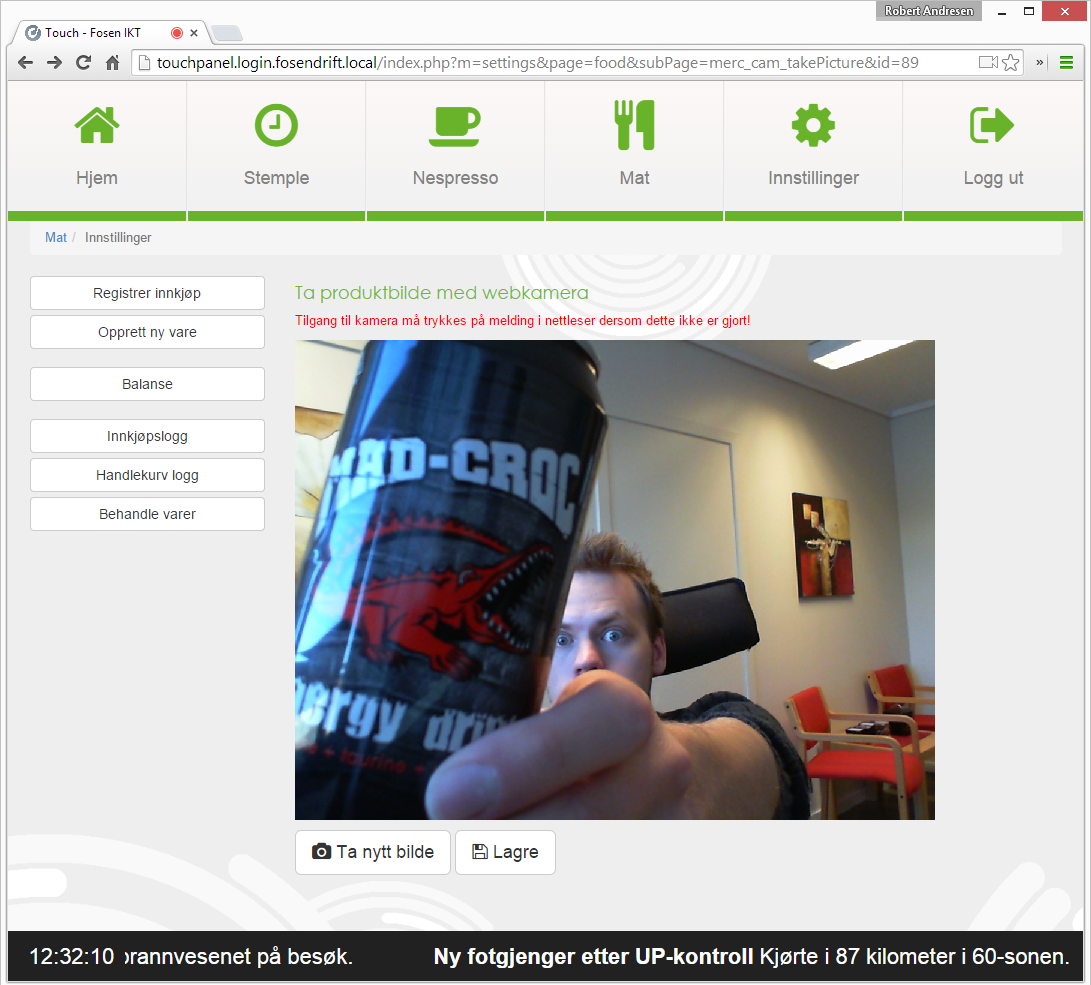
HTML5: Take photo with webcam
I needed a simple way to take product images on a local webpage.
Instead of taking a picture with you phone, send image to your computer and upload it – why not use a simple webcam?
I followed this tutorial: http://fuel-efficient-vehicles.org/pwsdb/?p=304. So look at the tutorial if you need more info.
takePicture.php
<script>// <![CDATA[
navigator.getUserMedia = (navigator.getUserMedia || navigator.webkitGetUserMedia || navigator.mozGetUserMedia );
if (navigator.getUserMedia) {
navigator.getUserMedia({
video:true,
audio:false
},
function(stream) { /* do-say something */ },
function(error) {
alert('Something went wrong. (error code ' + error.code + ')');
return false;
});
} else {
alert("Sorry, the browser you are using doesn't support the HTML5 webcam API");
return false;
}
// ]]></script>
<script>// <![CDATA[
// Put event listeners into place
window.addEventListener("DOMContentLoaded", function() {
// Grab elements, create settings, etc.
var canvas = document.getElementById("canvas"),
context = canvas.getContext("2d"),
video = document.getElementById("video"),
videoObj = { "video": true },
image_format= "jpeg",
jpeg_quality= 85,
errBack = function(error) {
console.log("Video capture error: ", error.code);
};
// Put video listeners into place
if(navigator.getUserMedia) { // Standard
navigator.getUserMedia(videoObj, function(stream) {
video.src = stream;
video.play();
$("#snap").show();
}, errBack);
} else if(navigator.webkitGetUserMedia) { // WebKit-prefixed
navigator.webkitGetUserMedia(videoObj, function(stream){
video.src = window.webkitURL.createObjectURL(stream);
video.play();
$("#snap").show();
}, errBack);
} else if(navigator.mozGetUserMedia) { // moz-prefixed
navigator.mozGetUserMedia(videoObj, function(stream){
video.src = window.URL.createObjectURL(stream);
video.play();
$("#snap").show();
}, errBack);
}
// video.play(); these 2 lines must be repeated above 3 times
// $("#snap").show(); rather than here once, to keep "capture" hidden
// until after the webcam has been activated.
// Get-Save Snapshot - image
document.getElementById("snap").addEventListener("click", function() {
context.drawImage(video, 0, 0, 640, 480);
// the fade only works on firefox?
$("#video").fadeOut("slow");
$("#canvas").fadeIn("slow");
$("#snap").hide();
$("#reset").show();
$("#upload").show();
});
// reset - clear - to Capture New Photo
document.getElementById("reset").addEventListener("click", function() {
$("#video").fadeIn("slow");
$("#canvas").fadeOut("slow");
$("#snap").show();
$("#reset").hide();
$("#upload").hide();
});
// Upload image to sever
document.getElementById("upload").addEventListener("click", function(){
var dataUrl = canvas.toDataURL("image/jpeg", 0.85);
$("#uploading").show();
$.ajax({
type: "POST",
url: "savePicture.php?id=<?php echo $getMercID; ?>",
data: {
imgBase64: dataUrl
},
success: function(data){
console.log(data);
$('#camFeedback').html(data);
}
}).done(function(msg) {
console.log("saved");
$("#uploading").hide();
$("#uploaded").show();
});
});
}, false);
// ]]></script>
<h3>Take a photo with your webcam</h3>
<p style="color: red;">You have to accept that your browser can access the webcam, if you haven't already!</p>
<div class="camcontent">
<video id="video" autoplay="autoplay" width="300" height="150"></video>
<canvas id="canvas" width="640" height="480"> </canvas>
</div>
<!-- Font awsome icons used in buttons -->
<div class="cambuttons" style="margin-top: 10px;">
<button id="snap" class="btn btn-default btn-lg" style="display: none;"> <i class="fa fa-camera"></i> Take picture </button>
<button id="reset" class="btn btn-default btn-lg" style="display: none;"> <i class="fa fa-camera"></i> Take new picture </button>
<button id="upload" class="btn btn-default btn-lg" style="display: none;"> <i class="fa fa-save"></i> Save </button>
<span id="uploading" style="display: none;"> Saving photo . . . </span>
<span id="uploaded" style="display: none;"> Success! Photo is uploaded. <a> Return </a> </span></div>
<div id="camFeedback"></div>savePicture.php
<?php
require('config.inc.php'); // Connect to database
$getMercID = clean($_GET['id']); // Get product ID
// Fetch photo only if product id is not empty
if (!empty($getMercID)) {
$rawData = $_POST['imgBase64'];
echo "<img src='".$rawData."' />"; // Show photo
list($type, $rawData) = explode(';', $rawData);
list(, $rawData) = explode(',', $rawData);
$unencoded = base64_decode($rawData);
$filename = $getMercID.'_'.date('dmYHi').'_'.rand(1111,9999).'.jpg'; // Set a filename
file_put_contents("images/products/$filename", base64_decode($rawData)); // Save photo to folder
// Update product database with the new filename
$query = "UPDATE products SET
product_photo='".$filename."'
WHERE id='".$getMercID."'";
$result = $mysqli->query($query);
}
// Stop if product id is missing
else {
die('Product ID is missing...');
}
?>
Kommentarer
Laster kommentarer …